Play A Virtual Horse as an app
Did you know you can play A Virtual Horse like an app on your phone or tablet? It opens full-screen, with no browser bars, straight from its own icon on your Home Screen. It feels much more like a game.
iPhone or iPad, Safari: tap the Share button (the square with the arrow), then Add to Home Screen.
iPhone or iPad, Chrome or Edge: tap the Share button at the top right, then Add to Home Screen.
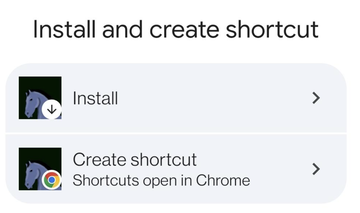
Android, Chrome: tap the menu (the three dots at the top right), then Install app or Add to Home screen. Pick Install so it opens as an app:
Then open the game from the new horse icon. You stay logged in, and everything works just like before, only bigger.
Happy riding!
— The A Virtual Horse team
iPhone or iPad, Safari: tap the Share button (the square with the arrow), then Add to Home Screen.
iPhone or iPad, Chrome or Edge: tap the Share button at the top right, then Add to Home Screen.
Android, Chrome: tap the menu (the three dots at the top right), then Install app or Add to Home screen. Pick Install so it opens as an app:
Then open the game from the new horse icon. You stay logged in, and everything works just like before, only bigger.
Happy riding!
— The A Virtual Horse team