Get notifications from the game
The game can now let you know when something happens while you are away. Notifications are off until you turn them on, and we never send ads.
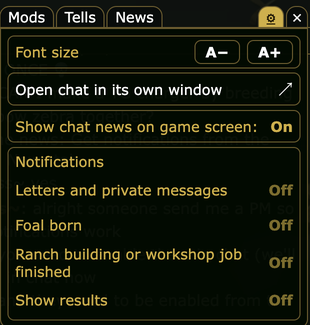
You can get a notification for:
- a new letter or private message (it never shows what it says)
- a foal being born
- a finished ranch building or workshop job
- one daily summary of your show results
To turn them on, open the chat, tap the gear at the right of the chat tabs, switch on Notifications, and tap Allow. Then pick which ones you want:
On Android, notifications work best when the game is installed as an app (see the news "Play A Virtual Horse as an app").
On iPhone and iPad, you first need iOS 16.4 or newer and the game added to your Home Screen. Open it from that icon, then turn notifications on.
You can switch them off any time from the same gear.
— The A Virtual Horse team
You can get a notification for:
- a new letter or private message (it never shows what it says)
- a foal being born
- a finished ranch building or workshop job
- one daily summary of your show results
To turn them on, open the chat, tap the gear at the right of the chat tabs, switch on Notifications, and tap Allow. Then pick which ones you want:
On Android, notifications work best when the game is installed as an app (see the news "Play A Virtual Horse as an app").
On iPhone and iPad, you first need iOS 16.4 or newer and the game added to your Home Screen. Open it from that icon, then turn notifications on.
You can switch them off any time from the same gear.
— The A Virtual Horse team